
Help
Can’t feel the pulses, or do the electrodes sting?
Dry EMS means you do not need to soak the suit. For the pulse to come through well, the skin under the electrodes still needs some moisture, for example from sweat. Most cases of “I can’t feel anything” or “it prickles” can be solved with better skin contact.
How to recognise poor contact
You feel little despite a high level, individual electrodes barely react, or it prickles in spots – often where the cable leads to the electrode. The pulse should spread evenly over the whole area and never sting. If it stings, stop training and improve the contact first.
Why the skin needs to be moist
The outer layer of the skin forms an electrical resistance between electrode and body. Particularly dry skin conducts the pulses poorly. Even if you increase the intensity, little may get through, or the pulse only feels localised.
Moisture lowers this skin resistance and improves contact with the electrode. Sweat contains water and dissolved salts that support electrical conduction. A light film of sweat helps the pulses overcome the skin barrier more easily. That is why the same setting can feel much stronger after warming up.
Warm up first
Warm up actively for at least 5 minutes until your skin is slightly moist. Under the electrodes, the film of sweat often forms before you notice it.
If your skin is still dry after warming up, Signa electrode spray can help improve contact with the electrodes.
Damp functional underwear under the suit?
There is nothing wrong with wearing close-fitting, damp functional underwear under the suit. Directly on the skin, however, the suit transmits the pulses more efficiently – that is what it is designed for. Dry underwear under the electrodes prevents contact.
If an electrode still does not react
Check the following points in order and test after each correction whether the muscle group concerned reacts again.
| Check | What to look for |
|---|---|
| Suit fit | Close-fitting; every electrode lies directly and flat against the skin. |
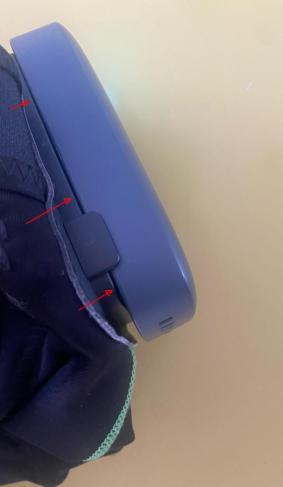
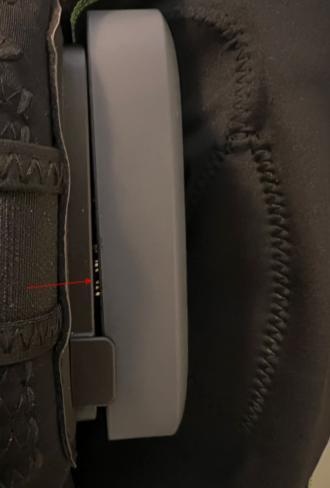
| PowerBox | End training and switch off the box. Place it on the mounting plate, slide it down and tighten the strap. It must sit flush; if there is a gap, reattach it. |
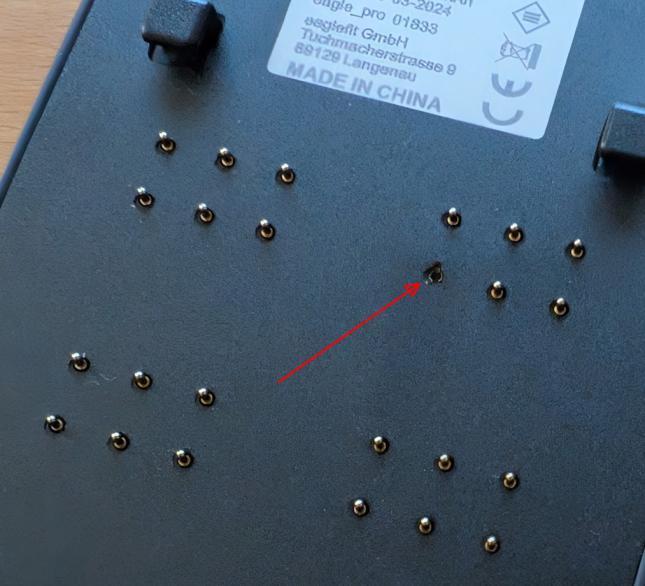
| Contact pins | Remove the switched-off box: are all pins straight and undamaged? If pins are bent or broken, stop using the system and contact us. |
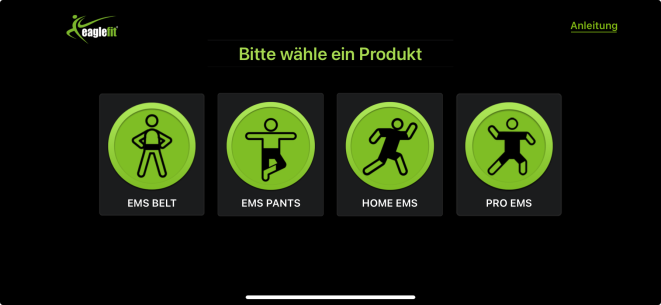
| Product in the app | Leave the training and select the product as shown on your invoice on the app’s home screen: HOME, PRO, CONNECT, PANTS, VEST or BELT. With the wrong product, the wrong muscle groups are controlled. |
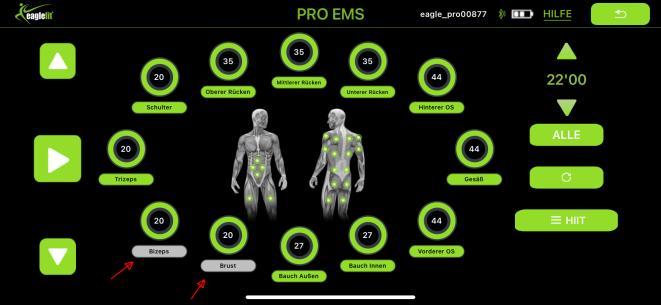
| Muscle group | A greyed-out muscle name means: switched off. Tap the name to switch the group on. What matters is the colour of the name, not of the number. |
| App version | Install the current eaglefit EMS SYSTEM app from the App Store or Google Play. Before reinstalling, note down your profiles and settings. |
How the PowerBox sits correctly
End training and switch off the PowerBox before reattaching it. Using the PRO PowerBox as an example, the pictures show the difference between a flush fit and missing contact.
Check the contact pins for damage
Remove the switched-off PowerBox and check all contact pins. If pins are bent or broken, stop using the system and contact us.
Choose the right product in the app
Leave the training and select your product as shown on your invoice on the home screen. The picture shows an example view; depending on the app version, further models may be shown.
Switch on a muscle group in the app
A greyed-out muscle name means: switched off. Tap the name to switch the group on. The PowerBox must be connected to the app.
Finger test: compare two electrodes
Compare a working electrode pair with the suspect one. Follow the safety information in your instructions. If there is damage or you are unsure, ask us first.
Prepare the suit
End training and switch off the PowerBox. Turn the suit inside out and lay it on a table with the electrodes facing up.
Connect the PowerBox
Attach the PowerBox to the suit straight and without a gap. Switch it on and connect it to the app.
Select a working pair
Choose the “Metabolism” programme and a muscle group that definitely works, for example the glutes. Leave only this group switched on and set the strength to 20. You test the right and the left electrode together.
Feel the first run
Start the test in the “Metabolism” programme. Moisten both index fingers slightly with water. At the same time, touch the right electrode with your right index finger and the left one with your left. Remember how it feels during the pulses.
Compare the suspect pair
Pause the test. Switch off the working group and switch on only the suspect group. Set the strength to 20 here too. Repeat the test in the “Metabolism” programme with slightly moist index fingers and compare how it feels during the pulses.
Record the result
End the test. If you feel a pulse with the first pair but not with the second, note both muscle groups and the difference. If you already feel nothing with the first pair, check the preparation first and repeat this run.
This information helps us
Message us via WhatsApp or Email. State your model, the affected muscle group and the result of the finger test. Also send us a photo of the back of the PowerBox.